Social preview monitoring for content & web teams

Test social previews before your team shares them.

Check the metadata behind your campaign, product and article links. Find missing images, weak titles and conflicting tags, then share the report with the people who can fix them.

Start with a free scan. No account or credit card. Then choose weekly follow-ups by email or Slack for up to 10 report pages.

Paste a page, a domain, or up to 10 URLs, one per line.

A clear place to start

See the issue. Find the page. Follow up.

  1. Check the sourceInspect titles, descriptions and images in the metadata your pages serve.
  2. Review the findingsOpen affected pages and use the issue details to decide what needs fixing.
  3. Check again after changesRun another scan after a fix, or set up recurring checks for the pages that matter.

Previews are based on fetched metadata. Slack, LinkedIn and X may show a different or cached card.

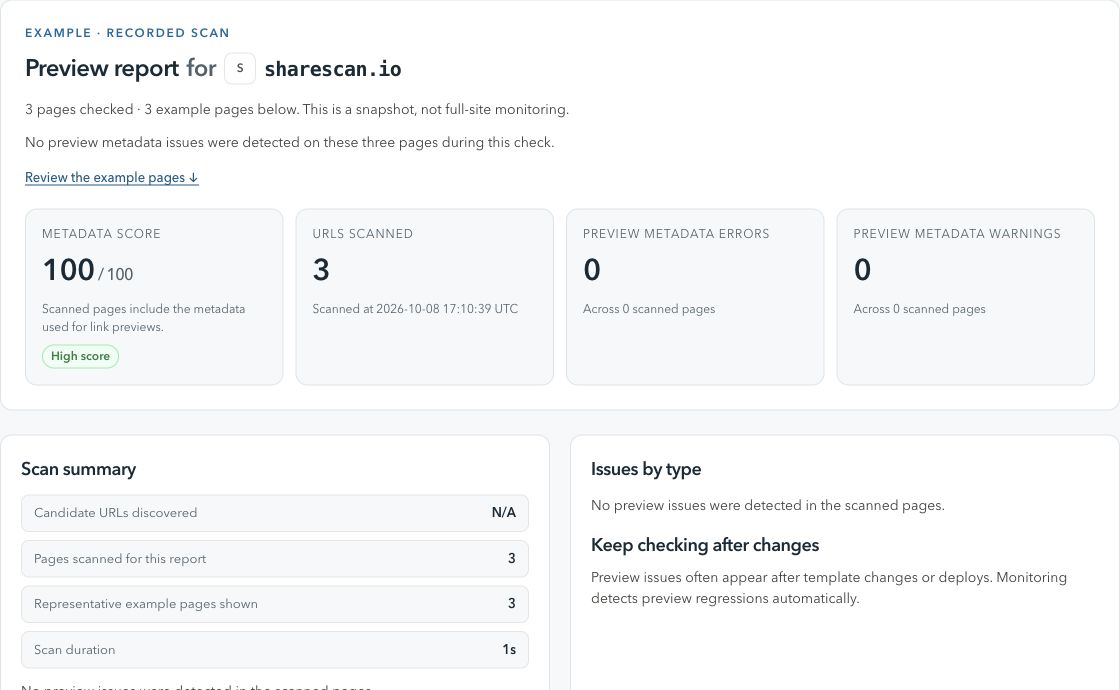
ShareScan / Preview reportActual product view
A ShareScan report showing a metadata score, checked pages and findings from a scan of sharescan.io.
A real scan of sharescan.io, captured 8 October 2026. A dated snapshot of three pages, not a live status.

From finding to fix

What to check and how to follow up.

Check 01

Start with the URL people will share

Preview bugs often start with the wrong URL: a tracking link, old slug, redirect chain, draft URL, or canonical variant that does not match the page you meant to test.

Why it happens

  • Campaign builders and CMS previews can create URL variants that behave differently from the final public page.
  • og:url, canonical URL, and the pasted URL can point at different destinations.
  • Redirect chains can send crawlers to metadata your team never inspected.

What to do next

  • Test the final public URL before the link is shared.
  • Check status code, redirect hops, canonical URL, and og:url together.
  • Keep one stable canonical destination for campaign, product, and article URLs.
Check 02

Check the card source, not just the browser view

A page can look fine in a browser while social crawlers see missing or stale metadata in the first HTML response.

Why it happens

  • Client-side rendering can add tags after crawlers have already fetched the page.
  • Image URLs can be blocked, too large, temporary, or unavailable without cookies.
  • Twitter/X-specific tags and Open Graph fallbacks can disagree after CMS or template edits.

What to do next

  • Verify og:title, og:description, og:image, twitter:card, and twitter:image in raw HTML.
  • Open preview images directly and confirm they are public, fast, and absolute.
  • Use channel-specific checks for Slack unfurls, X cards, LinkedIn cards, and general Open Graph output.
Check 03

Make preview QA part of the release habit

One-off checks catch today’s card, but previews often break later when someone changes a template, image pipeline, CMS field, or redirect rule.

Why it happens

  • Metadata usually lives between marketing, content, engineering, and platform teams.
  • Small template edits can affect hundreds of URLs without a visible page layout change.
  • Slack, LinkedIn, and X may cache an older card even after the source is fixed.

What to do next

  • Run a scan after production deploys and important CMS publishes.
  • Route preview issues to the team that owns the field, template, or image asset.
  • Choose weekly follow-ups by email or Slack from the report after the first check.

When your team needs broader coverage

Bring recurring checks into your publishing workflow.

Create a workspace and verify your domain to schedule scans, manage URLs and connect CMS or GitHub Actions triggers. The Free workspace plan covers up to 100 pages.

Before you start

A few useful details.

What is social preview testing?

Social preview testing checks how a URL is likely to appear when shared in Slack, LinkedIn, X/Twitter, messaging apps, and other surfaces that build cards from page metadata.

Which metadata should I test first?

Start with the final URL, status code, redirects, canonical URL, og:title, og:description, og:image, twitter:card, twitter:title, twitter:description, and twitter:image.

Why do Slack, LinkedIn, and X show different previews?

Each platform has its own crawler behavior, cache timing, truncation rules, and tag precedence. A clean source page reduces differences, but it does not make every platform render identically.

Can I test a preview before publishing?

You can test draft logic in staging, but the final check should run against the production URL after publish. Preview crawlers care about the public response, not the CMS editor view.

How often should preview checks run?

Run manual checks before launches and automated checks after deploys, CMS publishes, image pipeline changes, or template updates that affect shared pages.

Explore a related check

More ways to keep previews in view.