Social preview monitoring for content & web teams

Find metadata regressions after publishing changes.

Compare scan results to see new errors, resolved issues and changed tags. Help content and engineering teams trace unexpected titles, descriptions and preview images after a release.

Start with a free scan. No account or credit card. Then choose weekly follow-ups by email or Slack for up to 10 report pages.

Paste a page, a domain, or up to 10 URLs, one per line.

A clear place to start

See the issue. Find the page. Follow up.

  1. Check the sourceInspect titles, descriptions and images in the metadata your pages serve.
  2. Review the findingsOpen affected pages and use the issue details to decide what needs fixing.
  3. Check again after changesRun another scan after a fix, or set up recurring checks for the pages that matter.

Previews are based on fetched metadata. Slack, LinkedIn and X may show a different or cached card.

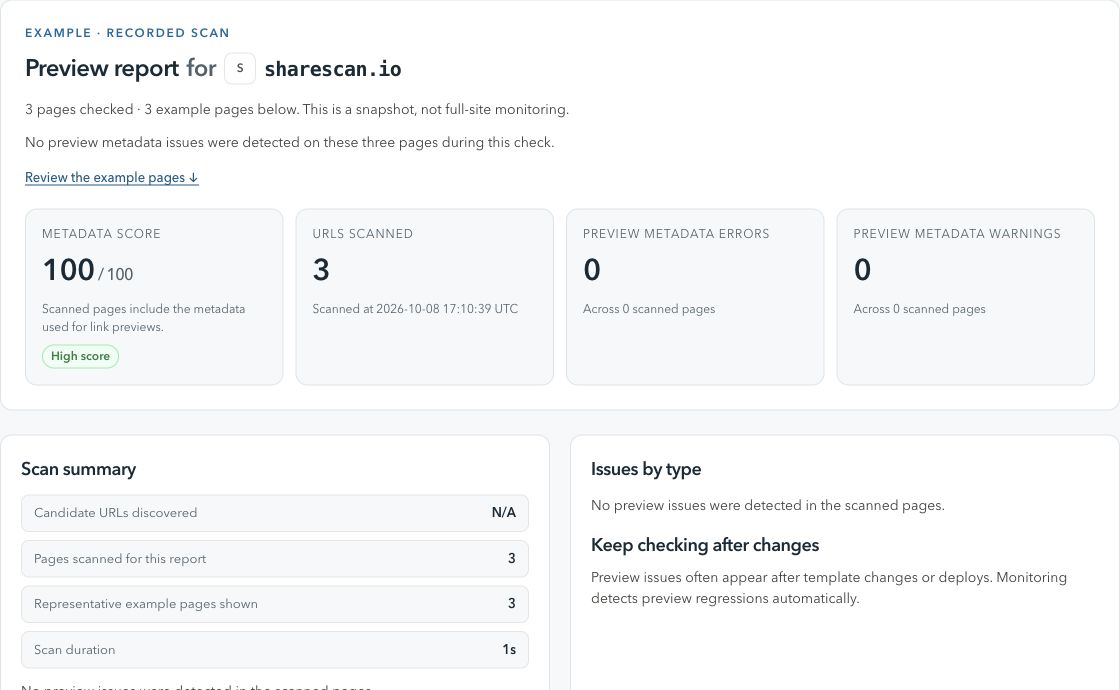
ShareScan / Preview reportActual product view
A ShareScan report showing a metadata score, checked pages and findings from a scan of sharescan.io.
A real scan of sharescan.io, captured 8 October 2026. A dated snapshot of three pages, not a live status.

From finding to fix

What to check and how to follow up.

Check 01

What metadata regressions look like

A regression happens when previously healthy preview metadata changes in a way that hurts sharing, indexing clarity, or team confidence.

Why it happens

  • Deploys updating shared head components or SEO templates.
  • CMS edits overwriting campaign-specific titles and descriptions.
  • Canonical, redirect, or image changes that affect crawler interpretation.

What to do next

  • Capture a point-in-time scan before or after launch.
  • Review report diffs and issue severity before handing off fixes.
  • Connect Slack to configure alerts for future metadata changes.
Check 02

Why regressions are hard to spot manually

Most teams check previews before launch, but fewer teams notice when templates or assets drift weeks later.

Why it happens

  • Metadata is often generated indirectly by CMS fields or frontend templates.
  • Preview issues may only surface when a customer, partner, or teammate shares a link.

What to do next

  • Monitor URLs that keep receiving traffic after launch.
  • Route alerts to the Slack channel where the owner can triage quickly.
  • Keep one report baseline so changes are easier to understand.
Check 03

Metadata fields worth monitoring

Broken previews usually come from a small set of fields changing unexpectedly.

Why it happens

  • og:title, og:description, og:image, and og:url drift.
  • twitter:* fields falling out of sync with Open Graph metadata.
  • Canonical URLs, robots rules, and HTTP responses changing after deploy.

What to do next

  • Scan pages after deploys and CMS publishes.
  • Monitor high-risk templates such as product, pricing, campaign, and blog pages.
  • Choose the important URLs and agree on who will follow up on findings.

When your team needs broader coverage

Bring recurring checks into your publishing workflow.

Create a workspace and verify your domain to schedule scans, manage URLs and connect CMS or GitHub Actions triggers. The Free workspace plan covers up to 100 pages.

Before you start

A few useful details.

What is metadata regression monitoring?

It is ongoing detection for important metadata changes that can break social previews or make shared links look wrong after a page previously looked healthy.

Which metadata fields matter most?

Start with Open Graph title, description, image, URL, Twitter Card fields, canonical URL, redirects, and crawler-accessible HTTP responses.

Does ShareScan change my metadata?

No. ShareScan scans and reports issues. Your team owns the code, CMS, or template changes that fix them.

How does Slack fit into setup?

Connect Slack from the report to receive setup instructions, choose what to monitor, and route alerts to the right team.

Explore a related check

More ways to keep previews in view.