Social preview monitoring for content & web teams

Follow the preview images your links depend on.

Check for missing or unreachable Open Graph images across important pages. Repeated scans help your team notice image issues after assets, CMS fields or templates change.

Start with a free scan. No account or credit card. Then choose weekly follow-ups by email or Slack for up to 10 report pages.

Paste a page, a domain, or up to 10 URLs, one per line.

A clear place to start

See the issue. Find the page. Follow up.

  1. Check the sourceInspect titles, descriptions and images in the metadata your pages serve.
  2. Review the findingsOpen affected pages and use the issue details to decide what needs fixing.
  3. Check again after changesRun another scan after a fix, or set up recurring checks for the pages that matter.

Previews are based on fetched metadata. Slack, LinkedIn and X may show a different or cached card.

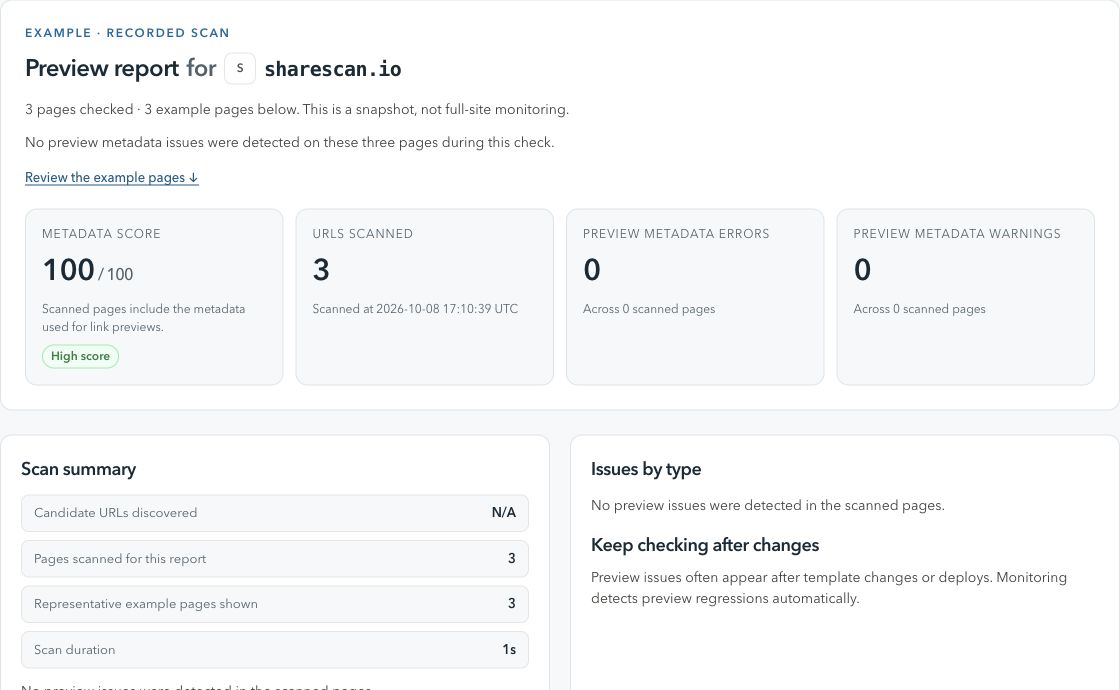
ShareScan / Preview reportActual product view
A ShareScan report showing a metadata score, checked pages and findings from a scan of sharescan.io.
A real scan of sharescan.io, captured 8 October 2026. A dated snapshot of three pages, not a live status.

From finding to fix

What to check and how to follow up.

Check 01

Why preview images break later

An og:image can pass a launch check and still fail later when templates, assets, or CMS fields change.

Why it happens

  • CMS entries published without required image fields.
  • Image URLs changing during CDN, resizing, or asset pipeline updates.
  • Preview images becoming blocked, redirected, too small, or unreachable.

What to do next

  • Scan the page to confirm the live og:image and twitter:image values.
  • Use stable, crawler-accessible image URLs for important pages.
  • Connect Slack to set up alerts when preview image metadata changes later.
Check 02

What image monitoring should cover

Image problems are not limited to missing tags; they can involve fetchability, dimensions, redirects, and inconsistent metadata.

Why it happens

  • Different templates output different image tags for the same content type.
  • Image transforms can alter dimensions or file size after publish.
  • Access rules can block social crawlers while browser users still see the page.

What to do next

  • Check image URLs, dimensions, HTTP status, and crawler accessibility.
  • Watch for metadata diffs that remove or replace campaign images.
  • Review report recommendations before relying on platform cache behavior.
Check 03

Where alerts help most

Preview image regressions are easy to miss until someone shares the link in public.

Why it happens

  • Launch pages get edited after ads, newsletters, or partner links are already live.
  • Product and article images change through CMS workflows.

What to do next

  • Monitor high-value landing pages and evergreen content.
  • Route preview image alerts to Slack for the team that owns fixes.
  • Use the free scan report as the baseline for what the page served before monitoring setup.

When your team needs broader coverage

Bring recurring checks into your publishing workflow.

Create a workspace and verify your domain to schedule scans, manage URLs and connect CMS or GitHub Actions triggers. The Free workspace plan covers up to 100 pages.

Before you start

A few useful details.

Can ShareScan force LinkedIn or Facebook to refresh an image?

No. ShareScan checks your source metadata and detects issues. Platform cache refreshes still happen through each platform's own tools and behavior.

Does this only check `og:image`?

No. The report also considers related social preview metadata, including Twitter Card image fields and fetchability signals.

When should I monitor Open Graph images?

Monitor pages where the preview image affects campaign performance, launch trust, product merchandising, or repeated social sharing.

How do I start?

Run a free scan, review the report, then choose weekly follow-ups by email or Slack. For broader coverage, create a workspace and verify your domain.

Explore a related check

More ways to keep previews in view.